
Webhook setup and troubleshooting
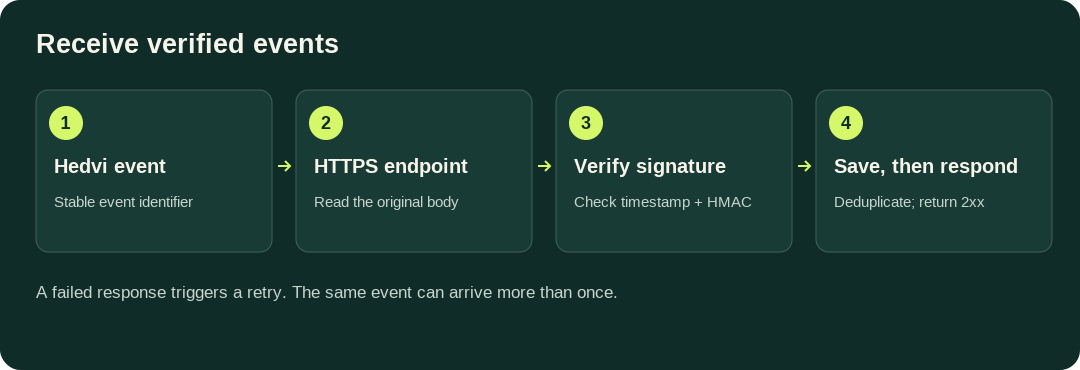
- Deploy a public HTTPS route on your own server.
- Open Developers → Webhooks, enter the endpoint URL and choose Add endpoint.
- Save the signing secret in your receiver's secret store. It is different from an API key.
- Implement the signature verification example using the exact raw request body, before parsing or modifying it.
- Persist or enqueue the verified event, deduplicate on
webhook-id, then return a 2xx response within 15 seconds. - Choose Send test event and open Deliveries. Check the attempt count, HTTP response and final state.
Common failures
| Symptom | Check |
|---|---|
| Signature mismatch | Use this endpoint's signing secret, the original bytes and the supplied timestamp. Do not re-serialize JSON before verification. |
| Timestamp rejected | Synchronize the server clock. Accept a maximum clock difference of five minutes. |
| Redirect or authentication page | Point directly at the final HTTPS receiver route. Redirects are not followed. |
| Timeout / 5xx | Save work quickly and process it asynchronously. Make repeated events safe. |
| URL rejected | Use a publicly resolvable HTTPS address. Localhost, private networks and cloud metadata hosts are blocked. |
Rotate, disable and replay
Use Rotate secret when the old secret may be compromised, then update your receiver immediately. Use Disable to stop delivery to an endpoint while fixing it. After repair, enable it and use the delivery's resend control for failed events. Replays retain the event ID; they must not repeat business actions already completed.