
Troubleshooting and support
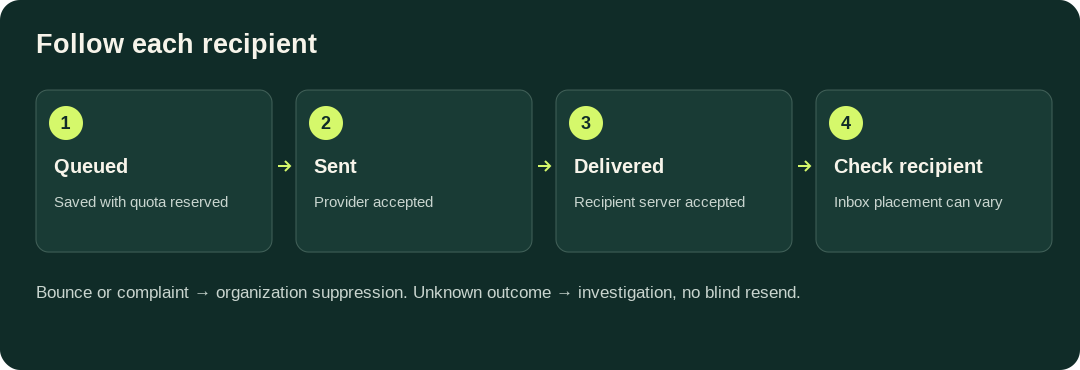
| Problem | Next step |
|---|---|
| Test email never reaches my inbox | Expected: test keys capture mail inside Hedvi. Verify a domain to activate live sending, then use a live key for external delivery. |
| Live request refused | Check automatic sending activation, key mode/scope, verified sender domain and quota in Settings. |
| Domain still pending | Compare every DNS row, disable Cloudflare proxying, check authoritative nameservers and choose Check now. |
| Queued for a long time | Check whether the project is paused or has reached its hourly limit. Preserve the email ID and contact support if the queue does not progress. |
| Delivered but not visible | Check spam, filters, forwarding and the exact recipient. Delivered means the server accepted it; do not assume inbox placement. |
| Suppressed | Read the suppression reason and recipient history. Do not repeatedly resend. |
| Delivery unknown | Do not automatically retry with a new key. Preserve the ID and ask support to investigate the original provider attempt. |
| 429 response | Read the error name: API rate, hourly warm-up, daily limit and monthly quota are separate limits. |
| Webhook failed | Check its response in Developers → Webhooks → Deliveries, then repair and resend the event. |
Contact us
Email hej@stackx.se for Swedish or English support. Include your organization/project ID, email or webhook event ID, timestamp with timezone, error name and expected behavior. For abuse or a security incident, state that in the subject. Never include passwords, live keys, card numbers or authenticator secrets.
If you receive unexpected email through Hedvi, send the original headers and the sender's address to the same contact. The sender controls its recipient list; we investigate misuse of the platform.