
Quotas, plans and retention
Your plan applies to the organization. Projects share its recipient and attachment allowances, and their hourly and daily acceptance budgets. Each project also respects its own limits.
| Plan | Recipients | Domains | Metadata / content |
|---|---|---|---|
| Free | 5,000 per UTC calendar month | 3 | 14 / up to 7 days |
| Flex | 10,000 per prepaid pack; valid 365 days | 10 | 30 / up to 7 days |
| Pro 50k | 50,000 per paid invoice cycle | 25 | 90 / up to 7 days |
| Pro 100k | 100,000 per paid invoice cycle | 100 | 90 / up to 7 days |
Read usage
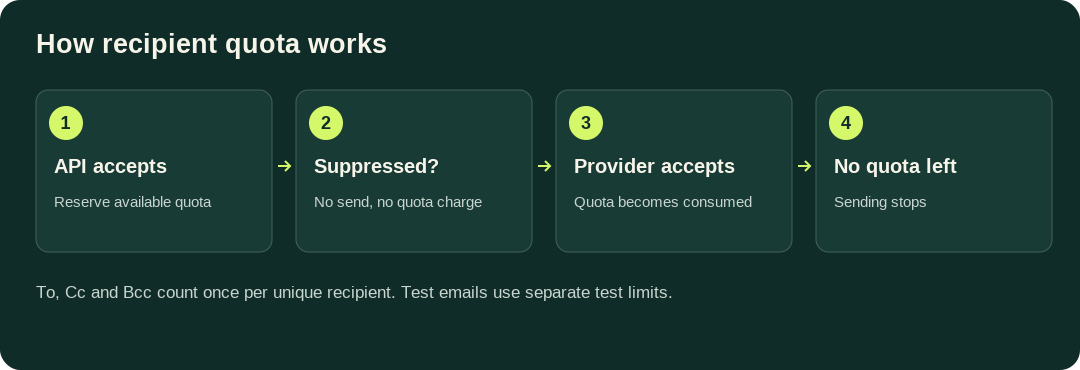
Open Settings → Usage and cost control. Reserved means accepted jobs are waiting for a final quota decision. Consumed means the sending provider accepted the recipient. Remaining excludes both. An uncertain send keeps its reservation while investigated.
Operational limits
API requests share 10 requests per second across an organization's keys, with a burst of 20. Each project allows 10 webhook endpoints, 20 active API keys and 50 newly created keys per 24 hours. The project's hourly and daily admission limits include suppressed recipients to bound processing; those recipients still use no paid sending credits. Retained live payloads have a separate default 1 GiB storage cap per project. Content deletion frees that capacity. Normal limits are 50/hour and 200/day on Free, 100/hour and 1,000/day with available Flex credits, 250/hour and 2,500/day on Pro 50k, and 500/hour and 5,000/day on Pro 100k. A higher owner-approved project limit applies only to that project. Hourly and daily counters reset at UTC boundaries.
When included and eligible prepaid units are exhausted, customer API sending stops, including password emails sent by your application. Hedvi account recovery uses a separate service. Warnings at 80% and 95% appear in the dashboard and through the hedvi.quota.warning webhook. They are not automatic top-ups. Flex credit expiry is shown in Settings; unused subscription quota does not roll over.
Change retention
- Open Settings → Retention.
- Choose content days from 0 to 7 and metadata days from 1 up to the plan maximum.
- Save. New messages receive those retention periods. Existing messages retain their previously assigned expiry.
Zero means delete after processing completes, not that content is never stored. Queued and retrying mail is retained while processing. Expired content cannot be recovered from the dashboard.
See billing and subscriptions for purchases, renewal, cancellation and payment review. A verified payment or complimentary grant activates its normal limits. When the allowance expires or is held, the applicable remaining plan sets the limits. Existing counters, sending pauses and explicit owner limits continue to apply.